Why Your WordPress Security Plugin Has a Blind Spot (And How to Fix It for Free)
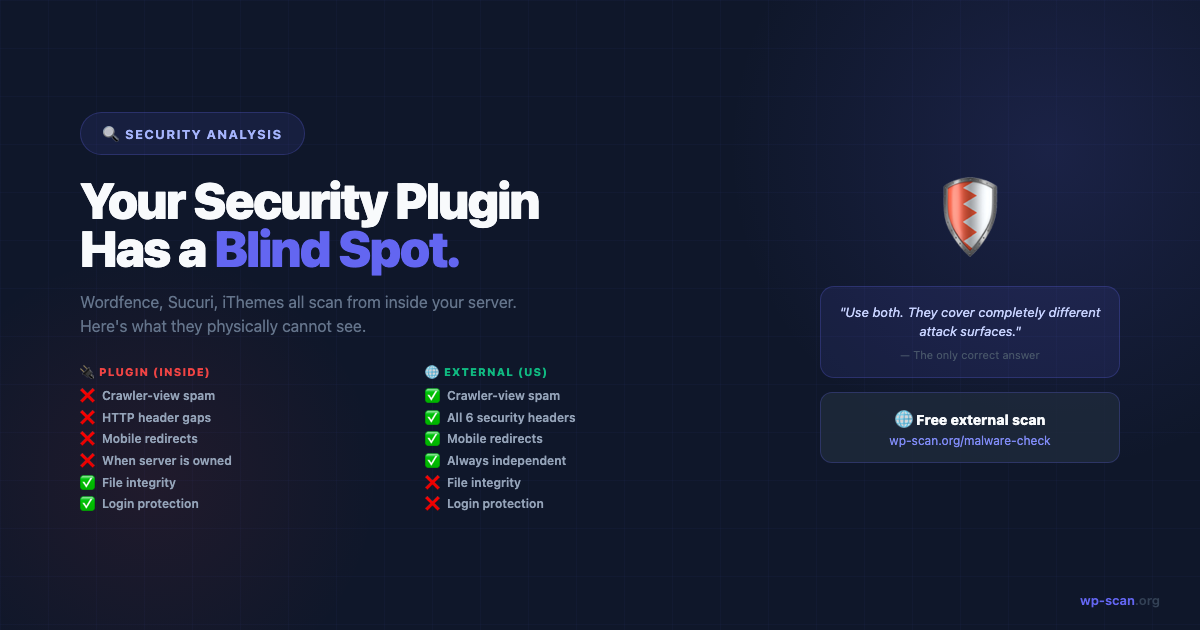
Wordfence, Sucuri, iThemes Security — they're all scanning from inside your server. That means there's an entire class of attacks they physically cannot detect. Here's what they miss and what to do about it.
The Problem With Scanning From Inside
I want to be clear upfront: security plugins are genuinely useful. Wordfence alone blocks over 55 million exploit attempts every month. You should use one.
But there's a structural limitation that no security plugin can solve by its very design — and almost no one talks about it.
They scan from inside your server.
This means they see your site the same way you see it: as a logged-in administrator on a trusted machine. An attacker, Google's crawler, or a visitor on a mobile device sees something completely different.
The Four Things Security Plugins Cannot Detect
1. Malware That Only Activates for Specific Visitors
Modern WordPress malware is conditional. It checks the visitor's IP, user agent, and referral source before deciding what to serve.
// Simplified example of conditional malware:
if (
    strpos($_SERVER['HTTP_USER_AGENT'] ?? '', 'Googlebot') !== false ||
    strpos($_SERVER['HTTP_REFERER'] ?? '', 'google.com') !== false
) {
    // Show spam links to search crawlers and visitors from Google
    echo '<div style="position:absolute;top:-9999px">' . $spam_content . '</div>';
} elseif (
    strpos($_SERVER['HTTP_USER_AGENT'] ?? '', 'Mobile') !== false
) {
    // Redirect mobile visitors to phishing site
    header('Location: https://fake-pharmacy-site.com');
    exit;
}
// For everyone else (including the site owner): show nothing
Your security plugin runs PHP processes on the server as an admin user. It will never trigger this condition. It has no idea this code exists.
An external scanner, running from outside with the right user agents, will detect it immediately.
2. HTTP Response Header Vulnerabilities
Security headers like Content-Security-Policy, Strict-Transport-Security, and X-Frame-Options exist in the HTTP response — not in any file on your server.
A security plugin can tell you to add these headers, but it cannot verify whether they're actually being sent in responses to real visitors. There are edge cases where headers configured in .htaccess aren't inherited correctly, or where a CDN is stripping them before they reach the browser.
wp-scan.org/malware-check checks all 6 critical security headers from outside your server — the only way to know they're actually working.
3. Redirects That Only Affect Outbound Traffic
One of the most common infection patterns is a redirect that triggers only when:
- •The visitor came from a search engine (referral-based redirect)
- •The visitor is on a mobile device
- •The visitor hasn't visited the site before (cookie check)
The site owner visits the site directly, never comes from Google, and usually on desktop. They see nothing wrong.
4. A Compromised Security Plugin Itself
This one is uncomfortable but real. If your server is fully compromised, the attacker can modify the security plugin's files directly. A compromised Wordfence installation will report your site as clean even while malware runs actively.
The 2026 supply chain attacks specifically targeted plugin files — which means for a period of time, the security plugins on affected sites were themselves compromised.
An external scanner has no relationship to your server files. It cannot be compromised by anything on your server.
What Security Plugins Are Actually Good At
To be fair:
| Task | Security Plugin | External Scanner |
|---|---|---|
| File integrity monitoring | ✅ Best tool for this | ❌ Cannot access files |
| Brute force login protection | ✅ Best tool for this | ❌ No server access |
| Known malware signature scanning | ✅ Good (on accessible files) | ✅ Good (on public behaviour) |
| HTTP header verification | ❌ Cannot see HTTP responses | ✅ Best tool for this |
| Crawler-view spam detection | ❌ Runs as admin, not crawler | ✅ Best tool for this |
| Redirect-to-spam detection | ❌ No external perspective | ✅ Best tool for this |
| XML-RPC exposure | ⚠️ Can tell you to disable | ✅ Verifies it's actually blocked |
| User enumeration | ⚠️ Can add redirect rules | ✅ Verifies from outside |
| Works when server is compromised | ❌ Cannot | ✅ Yes |
The Free Fix
The external scanner that covers all four blind spots:
It runs 22 checks from outside your server, including:
- •Malware + redirect detection — scans with multiple user agents including mobile and search crawler simulation
- •Security headers — verifies all 6 headers are actually present in HTTP responses
- •XML-RPC exposure — confirms your block is working, not just configured
- •User enumeration — tests both
?author=1redirect and REST API endpoint - •WordPress version exposure — checks all known leakage vectors
- •Dangerous file exposure —
.env,wp-config.php, debug logs, webshells
How to Build a Complete Detection Stack
For a WordPress site with no budget for paid security tools:
Layer 1 — External scan (free)
→ wp-scan.org/malware-check
→ Run monthly, or after any plugin update
→ Covers: redirects, spam, headers, user enum, version, dangerous files
Layer 2 — Free security plugin

→ Wordfence (free tier) or Defender Security

→ Covers: file integrity, login protection, in-file malware signatures
Layer 3 — Google Search Console (free)

→ Security Issues tab

→ Covers: Google's crawler view — blacklisting, malware flags
Layer 4 — Uptime monitoring (free tier)

→ UptimeRobot (free)

→ Covers: downtime detection if site gets suspended or defaced
This stack costs $0, takes about 30 minutes to set up, and covers the full attack surface.
For paid security, adding Sucuri's WAF ($9.99/month) or Cloudflare Pro adds a blocking layer — but the detection stack above should come first, because you can't defend against what you can't see.
The Scenario That Illustrates Everything
Here's a real pattern that happens constantly:
A WordPress site owner has Wordfence running. Wordfence reports everything is fine. Three months later, they notice their Google rankings have collapsed. They investigate and discover their site has been serving spam pharmacy links to Google's crawler for 12 weeks — links that never showed up when they visited the site themselves.>
Wordfence never flagged it because the malware checked whether the visitor was a Google crawler before activating. The security plugin, running as a server process, was never shown the malware.
An external scan at any point during those 12 weeks would have caught it immediately.
The fix is simple. The tool is free. The 60 seconds it takes is worth it.
Free external scan — 22 checks, instant report. No plugin, no account.
Run Free Scan → wp-scan.org/malware-checkAuditing a theme or plugin before you install it? Scan the ZIP source code instead →
Builder of wp-scan.org — a free external WordPress malware scanner trusted by thousands of site owners. With 9+ years building and securing WordPress products, Rajan writes practical security guides based on real attack patterns he's encountered. You can find more of his work at rajangupta.com.
📬 Enjoyed this article?
Get the next one in your inbox — free WordPress security guides, weekly.