The 2026 WordPress Supply Chain Attack: 30+ Plugins Were Backdoored. Is Your Site Still Infected?
In 2026, more than 30 legitimate WordPress plugins were silently backdoored after an attacker purchased the Essential Plugin portfolio and spent months laying groundwork before activating the payload. The attack was invisible to site owners. If you ran any of these plugins, your site may still be compromised even after updates.
What Happened
In April 2026, security researchers discovered that over 30 WordPress plugins had been secretly backdoored as the result of a multi-stage supply chain attack that had been in preparation since mid-2025.
The attack followed this sequence:
- 1An attacker identified the Essential Plugin portfolio — a collection of 31 productivity and SEO tools collectively installed on 400,000+ WordPress sites — and acquired it via Flippa for a six-figure sum
- 2Over the following 8 months, the new owner introduced a dormant backdoor into the codebase, disguised as routine code refactoring
- 3In April 2026, the backdoor was remotely activated via an Ethereum-based command-and-control mechanism designed to evade domain-based blocklists
- 4The malicious payload ran on every site with an affected plugin installed — automatically, silently, through a trusted update channel
Sources: BleepingComputer, Rescana Supply Chain Analysis, TechCrunch
Why You Probably Didn't Notice
The payload was specifically engineered to be invisible to site owners. It used cloaking — a technique that serves different content based on who is visiting.
// Simplified illustration of the cloaking logic used:
function essentialplugin_content_filter($content) {
    $ua = strtolower($_SERVER['HTTP_USER_AGENT'] ?? '');
    $ref = strtolower($_SERVER['HTTP_REFERER'] ?? '');
// Only activate for search engine crawlers and search-referred traffic

    if (

        strpos($ua, 'googlebot') !== false ||

        strpos($ua, 'bingbot') !== false ||

        strpos($ref, 'google.com') !== false

    ) {

        // Inject hidden spam links (pharma, casino, adult)

        return $content . ' ' . base64_decode($GLOBALS['_esp_payload']);

    }

    return $content; // Site owner sees: nothing wrong

}
When you visited your own site — logged in, directly in your browser — you saw a normal, functioning website. The malware only activated for Google's crawler and visitors arriving from search engines.
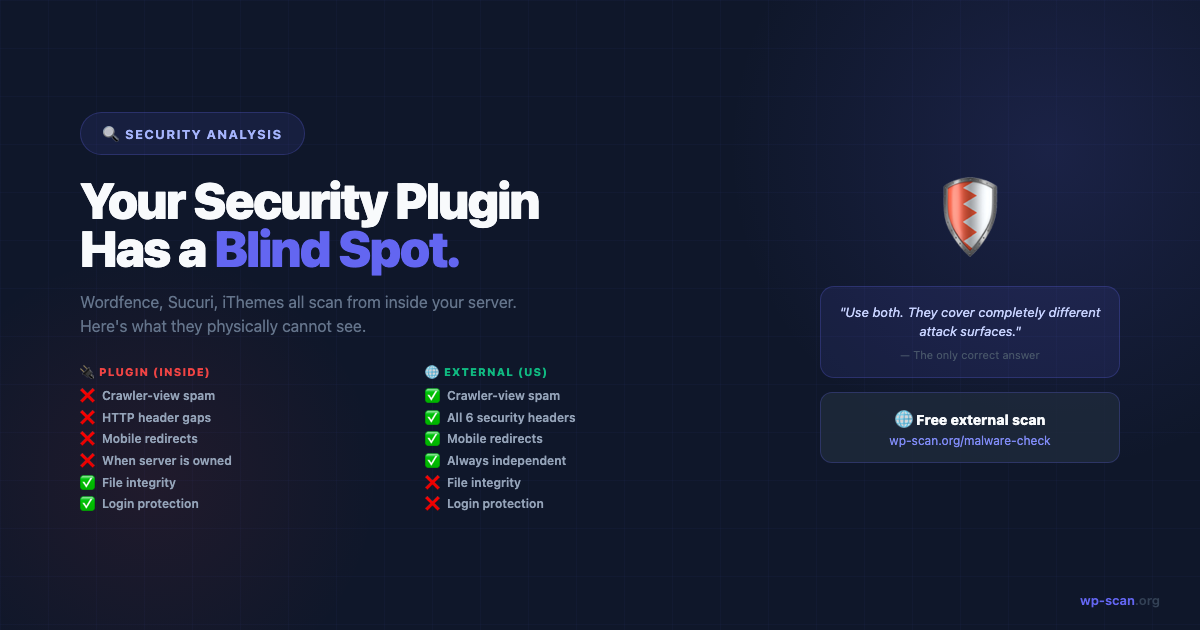
This means your security plugin also saw nothing unusual. Server-side scanners run as authenticated admin processes, not as search engine crawlers.
Which Plugins Were Affected
The attack targeted the WP Online Support / EssentialPlugin portfolio. Affected plugins included:
- •Essential Addons for Elementor (EssentialPlugin version)
- •WP Security Ninja Pro
- •WP Reset Pro
- •Essential Grid
- •WP Maps Pro
- •Contact Form 7 Multi-Step Forms (EP Edition)
- •26 additional plugins in the same portfolio
WordPress Admin → Plugins → All Plugins
Search for: "EssentialPlugin", "WP Online Support", "WP Support"
All affected plugins were pulled from WordPress.org. If any appear in your plugin list, they should be removed immediately — even if "updated" or "deactivated."
How to Tell If Your Site Was Compromised
Method 1: External Scan (2 Minutes)
An external scanner checks what Google actually sees when it crawls your site — including the spam content that was hidden from you.
The scan will flag:
- •Hidden spam links visible to search engine crawlers
- •Suspicious outbound callbacks to known C2 infrastructure
- •Unexpected admin account enumeration via REST API
- •Security header gaps introduced by the backdoor
Method 2: Search Your Own Site on Google
# Search Google for your domain:
site:yourdomain.com
# Look for:

# - Pages with titles in other languages

# - Results with pharmacy or gambling keywords in the description

# - Pages you don't recognise
If your site has been injecting spam for weeks or months, Google may already have de-indexed infected pages — which shows up as a sudden traffic drop.
Method 3: Check for Hidden Admin Accounts
# WordPress Admin → Users → All Users
# Look for accounts you didn't create
# Via WP-CLI:

wp user list --role=administrator
# Common backdoor usernames in this attack:

# wp_support_helper, wpos_admin, ep_system, analytics_user
Method 4: File Inspection
# Via SSH — search for the known C2 callback code:
grep -r "cdn-updates.net" /wp-content/plugins/ -l
grep -r "essentialplugin.com" /wp-content/plugins/ -l
grep -r "wpos-analytics" /wp-content/plugins/ -l
# Search for the Ethereum address resolver pattern:

grep -r "eth_call" /wp-content/ --include="*.php" -l

grep -r "infura.io" /wp-content/ --include="*.php" -l
How to Clean Up
- 1Remove all affected plugins immediately — do not wait for a clean replacement
- 2Delete unknown admin users — every account you didn't create
- 3Search for and delete C2 callback code — use the grep commands above
- 4Restore wp-config.php from a pre-infection backup or rebuild it manually if any backdoor code was injected there
- 5Regenerate WordPress security keys — go to api.wordpress.org/secret-key/1.1/salt
- 6Re-scan externally — wp-scan.org/malware-check — to confirm no residual issues
The Bigger Problem: WordPress Has No Code Signing
Unlike npm (which has signed packages) or Apple's App Store (which has code review), WordPress plugin updates go live with no mandatory cryptographic signing or independent code verification.
This means any plugin author whose account is compromised — or any plugin that changes ownership — can push malicious code to every auto-updating site within hours.
What you can do:
- •Monitor plugin changelogs when you update — any unusual changes in new releases deserve scrutiny
- •Check plugin ownership history before trusting a newly-updated plugin (plugins.svn.wordpress.org)
- •Run an external scan monthly — it's the only detection method that catches this class of attack regardless of where the malicious code came from
The Lesson That Won't Go Away
This is the third major WordPress plugin supply chain attack in 18 months. The attack vector works precisely because plugins are trusted — and that trust is exploited at the point of update delivery.
Detection requires observing your site from the outside. A security plugin running on your server cannot see what your server is serving to Google's crawler. An external scanner can.
Free external scan — 22 checks, instant report. No plugin, no account.
Run Free Scan → wp-scan.org/malware-checkAuditing a theme or plugin before you install it? Scan the ZIP source code instead →
Builder of wp-scan.org — a free external WordPress malware scanner trusted by thousands of site owners. With 9+ years building and securing WordPress products, Rajan writes practical security guides based on real attack patterns he's encountered. You can find more of his work at rajangupta.com.
📬 Enjoyed this article?
Get the next one in your inbox — free WordPress security guides, weekly.